Timber cutting plans
The Timber tab creates a linear cutting plan. “Linear” means each board is treated as one usable length with a fixed cross-section. SawWise allocates required cut lengths among configured purchase lengths and includes blade kerf.
What the plan contains
Each timber stock type has a summary, board table, and Scaled cut diagram. The table shows:
- Board number.
- Stock purchase length.
- The part cuts allocated to that board.
- Used length, including the planned kerf treatment.
- Remaining Waste.
The summary also reports boards, stock lengths, reusable offcut, discard, kerf, setups, and efficiency. Coloured sections and the legend connect cut lengths to part names.
Efficiency is the planned used length, including part lengths and kerf, divided by purchased stock length. It is not the percentage of stock that becomes finished parts.
Each diagram is scaled to its own stock length. Do not compare bar widths between boards as though all bars share one common scale.
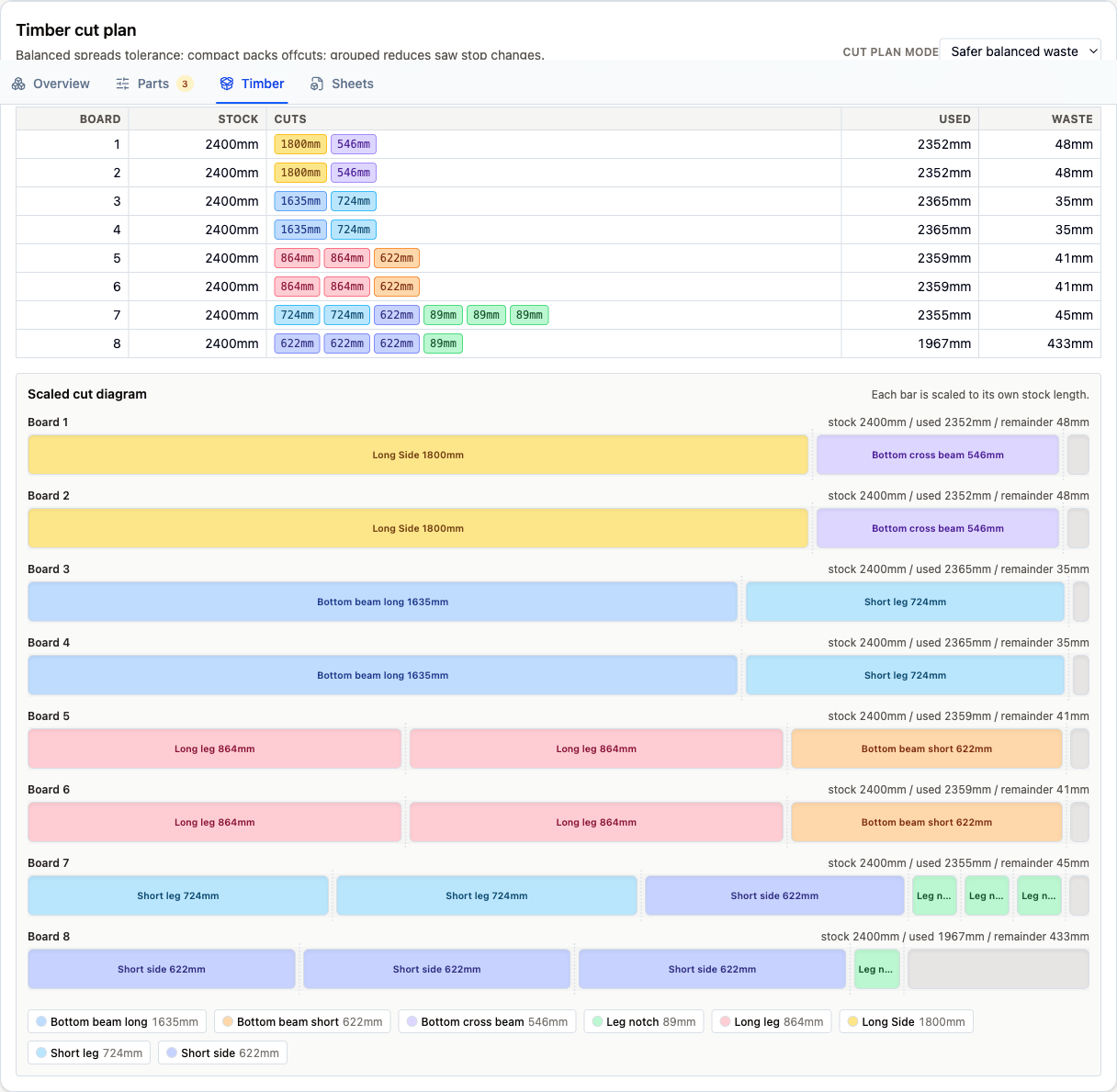
A timber plan for the workbench example. Colours connect each table allocation to its scaled board diagram.
Kerf: This is the material removed by the blade. SawWise leaves the configured amount between cuts; you choose which side of the line to cut when setting up the real board.
Three timber plan styles
Choose Cut plan mode in the Timber tab or Timber plan style in Settings.
| Style | Practical aim | Trade-off |
|---|---|---|
| Safer balanced waste | Spread remaining length more evenly and avoid plans dominated by very tiny remainders | May produce several moderate offcuts instead of one large offcut |
| Compact offcuts | Concentrate remaining material into fewer, larger offcuts where the main board and waste totals allow it | Some boards can finish with very little spare length |
| Grouped repeat cuts | Keep equal-length cuts together and reduce changes to stops or measurement setups | Can use more boards or material than a waste-focused plan |
Despite the name, Safer balanced waste simply means less awkwardly distributed remainder when board count and waste are otherwise similar.
Compact offcuts is useful when a larger remainder has value in the workshop. Grouped repeat cuts can make batches easier when you use a stop or repeat the same measurement.
On larger jobs, two modes may find the same practical answer. Compare board count, stock length, waste, and setups, then pick the plan you like best.
Mixed stock lengths
When a timber entry contains several available lengths, SawWise may combine them. What to buy lists each resulting length separately.
Editing Length for plans in Settings collapses that timber entry to the one entered length. This is useful when only one supplier length is actually available, but it removes the other choices from later calculations for that stock.
Board numbers show where the pieces fit; they are not a required cutting order. Choose a sequence that suits your saw and setup.
Reusable and discard labels
SawWise divides remainders into Reusable offcut and Discard based on size. They are only suggestions for keeping the plan tidy.
A long remainder with a knot or split may be no use at all, while a tiny piece can be perfect for a test cut. Keep whatever is useful to you.
Before cutting
- Match the real board to its planned thickness, width, and usable length.
- Mark a datum end and note any knots, splits, or damaged areas.
- Decide the cutting order and blade side that suit your setup.
- Support the workpiece and offcut, and make sure a stop cannot trap the offcut against the blade.
- Measure important pieces as you go.
Use your usual guards and protective equipment, and follow the instructions for your tool.
Grain, defects, and milling
SawWise works with usable rectangular lengths rather than the character of a particular board. For grain matching, rough hardwood, jointing, planing, or defect removal, add the extra material you normally allow and use the plan as a starting allocation.
Configure blade width and plan behaviour in Settings and units.